Chapter 2
- Chapter Sections
- Section 2.1: Primitive Types (problems)
- Section 2.2: Integer Division (problems)
- Section 2.3: Boolean Variables and Expressions (problems)
- Section 2.4: Strings (problems)
Introduction
So far we have seen two basic types of data, numbers and strings. As we will see there are several other important types. In addition, there are actually two different types of numbers. In order to simplify code, the two different number types appear very similar in Python. In other languages there is often a more obvious difference. The two types of numbers are integers and floating point numbers.
Section 2.1: Built-In Data Types
Integers versus Floating Point Numbers
Just as in a math class, an integer is a whole number that may or may not be negative, denoted in Python and most other programming languages as int. Floating point numbers offer us a way of representing a partial quantity. Roughly speaking, floating point numbers can be though of as numbers with a decimal point. In fact that is the way the two numerical types are distinguished in Python. In Python and in other languages, floating point numbers are denoted by float.
Numerical Data Types
| Number | Type |
| 22 | int |
| 0.231 | float |
| -121 | int |
| -9.991 | float |
| 10.0 | float |
A quick way of telling if a number is a floating point number in Python is to check if there is a decimal point. Even if the number is an integer, in the mathematical sense, such as 10.0, if there is a decimal point, it is a float data type in Python.
Other Data Types
We have already seen strings, in Python strings are denoted by str. Another very useful data type is called the Boolean type. The Boolean type is denoted by bool in Python. Boolean data types are in some ways the simplest: a Boolean variable can only be True or False. They offer us a way of working with logic and are very common.
Other Common Data Types
| Value | Type |
| "squid" | str |
| "Fred Smith" | str |
| "495" | str |
| True | bool |
| False | bool |
Recall that a sequence of digits, such as "495" is a string in Python, not a number. The ways in which the number 495 and the string "495" are represented inside of the computer are very different. This will be discussed in more detail in chapter 3.
Composite Types and Strings
There are also data types that are more complex than numbers and Boolean types. These types are composed of other types. One such type is called a list, which is how it is denoted in Python: list. A list is, as you may have guessed, is a list or collection of other variables, possibly including other lists. It is also possible to create custom types that are composites of other types. A custom type is called a class. Classes will be discussed in depth in chapter 4 and lists will be discussed in depth in chapter 5.
It might surprise you, a string is a much more like a list than a primitive data type such as a number or the Boolean type. A string is essentially a simple list, but only of characters. In many other programming languages there is a separate character data type for individual characters. However, Python does not have a separate data type for a single character in the way other common programming languages do such as Java and C++.
Converting Data Types
In Python and other programming languages, it is possible to convert a variable from one data type to another. Although some conversions may not be very useful, other conversions are very common and useful. For example, there is a function called raw_input that we will use later. This is a very useful function for asking the user for information. However, this function only ever returns a string. But, if what we really need is an integer from the user? Well, we can convert the string we receive from the user into an integer. Somewhat confusingly, the functions that Python has for making these conversions have the same names as the data types themselves.
| Function | What It Does |
| int( ___ ) | Converts to a int type. |
| float( ___ ) | Converts to a float type. |
| str( ___ ) | Converts to a str type. |
The str function will work without creating an error most of the time. Unfortunately, the int function is very picky and there are lots of ways to create an error.
What Can and Cannot Be Converted:
- int( ___ ) can convert any float type. BUT the decimal part is always lost. The number is not rounded.
- int( ___ ) can convert a str type, if the string only has numerical digits and a possible negative sign without a decimal point.
- float( ___ ) can convert any int type.
- float( ___ ) can convert a str type, if the string only has numerical digits with a possible negative sign and a possible decimal point.
- str( ___ ) can convert any int or float type.
Conversion Examples
| Code | Return Value |
int(33.3) | 33 |
| int(9.9999999) | 9 |
| int("33") | 33 |
| int("five") | ERROR |
| int("33.3") | ERROR |
| float(-65) | -65.0 |
| float("9.999") | 9.999 |
| float("33") | 33.0 |
| float("33.3") | 33.3 |
| float("two.three") | ERROR |
| str(-65) | "-65" |
| str(9.999) | "9.999" |
Although it appears that the str function is simply putting quotes around the number, as was discussed before, the way in which these data types are represented inside the computer are very different. This will be discussed much more in chapter 3.
Another detail to consider is that the int function can lose information when converting from a float type. The decimal part of a float number is just simply lost. Although in a mathematical sense the number 9.99999999 is much closer to the number 10, it is instead converted to 9 because the decimal part, .99999999, is lost.
If rounding a floating point number is what you really want to do, use the round function instead. Note, however, round returns a floating point number. One trick to round positive floating point numbers to become integers is to add 0.5 to the number then use the int function. Alternatively, the int function can be used after the round function.
Rounding Examples
| Code | Return Value |
round(33.3) | 33.0 |
| round(9.9999999) | 10.0 |
| int(round(33.3)) | 33 |
| int(round(9.9999999)) | 10 |
| int(33.3 + 0.5) | 33 |
| int(9.9999999 + 0.5) | 10 |
The type Function
The type function returns the type of a variable. This is useful if you are not sure of the type of value that is stored in a variable. The type function can be used with all types, including lists and classes.
The
type Function
| Code | Return Value |
type(33.3) | float |
| type(-100) | int |
type("fish") | str |
x=555
type(x) |
int |
Section 2.1 Name:____________________
Built-In Data Types
Score: /5
Problems
- Vocabulary Matching: Match each term with the best fitting description.
| int | _____ Data type used to represent true or false. |
| float | _____ Data type used to represent integers. |
| str | _____ Data type used to represent numbers that have a decimal point. |
| bool | _____ Data type used to represent text. |
- Determine the type associated with the value. This is what the type functions returns.
| Value | Type |
| 34 | |
| -122 | |
| 4.1 | |
| "seven" | |
| "Sam" | |
| True | |
| 24.0 | |
| "512" | |
- Determine the return value. If an error would be created instead, write error.
| Code | Return Value |
| int(0.9999) | |
| int(56.32) | |
| float(32) | |
| float("six") | |
| int("eight") | |
| float(-12) | |
| float("56.32") | |
| int("142") | |
| int("4.321") | |
| str(-133) | |
| str(76.45) | |
- Convert f into an integer called i. What will be stored in i?
f = 23.838 @@@@@
Section 2.2: Integer Division
Introduction
When we divide two integers in Python using the operator /, for example 5 divided by 4, we get, as expected, the number 1.25. However, 1.25 is a float type, not an int type as 5 and 4 are. Alternatively, we may also use another division operator //, which results in an int. The operator // is for integer division. With integer division, the result is the whole part of the answer to the division problem. Any fractional part of the result is lost.
Examples
| 17/5 |
17//5 |
5/4 |
5//4 |
9/10 |
9//10 |
| 3.4 |
3 |
1.25 |
1 |
0.9 |
0 |
The Modulus Operator: %
Integer division in Python loses information. For example, when we divide 5//4 and 6//4, both division problems give us the same answer: 1. The way we can get that missing information is to use the modulus operator. The symbol in Python for the modulus operator is the percentage symbol %. What the modulus operator actually gives us is the remainder of the division problem. If you think back to elementary school, when you first learned long division you probably found the remainder at the end of the problem. For example, when we divide 5/4 using long division we get 1 with a remainder 1. Dividing 6/4 we get 1 with the remainder 2. The integer that we get for the remainder is what the modulus gives us.
Finding the Remainder
| 5%4 |
6%4 |
113%100 |
10%2 |
11%2 |
3%5 |
0%5 |
| 1 |
2 |
13 |
0 |
1 |
3 |
0 |
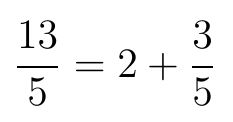
One thing to consider is what the remainder of a division problem really is. Consider the division problem 13/5. When we do long division we get 2 with the remainder 3. Notice also if we write 13/5 as a mixed fraction we get: 2 and 3/5. The remainder is always the numerator of the fraction part of a mixed fraction. The remainder is what remains inside the fraction. The whole part is the result of integer division and is called the quotient. By finding both the quotient and the remainder of a division problem, we can do division while using only integers, without losing any information.

Remainder as the Numerator of the Remaining Fraction
Order of Operations
Order of operations is the order that arithmatic operations are expected to be computed. In Python, order of operations works very much the way it does in a math class. You may have learned the acronym P.E.M.D.A.S. This stands for:
- Parentheses: ( )
- Exponents: **
- Multiplication: *
- Division: /
- Addition: +
- Subtraction -
When we evaluate an expression such as (1+3)**2 in a math class, we first evaluate whatever is in Parentheses, then evaluate any Exponents we may have and so on. So at first (1+3)**2 becomes 4**2, which then becomes 16. Python evaluates expressions in exactly the same way.
What makes Python different than what you see in most math classes is that we have more operators to work with, such as the modulus operator. The modulus operator comes just after division in Python.
- Parentheses: ( )
- Exponents: **
- Multiplication: *
- Division: /
- Modulus: %
- Addition: +
- Subtraction -
Order of Operations
| Code | Resulting Value |
12/4+2 | 5 |
| 10-4/2 | 8 |
| 6/(2+1) | 2 |
| 3+2/5 | 3 |
| 7%5+2 | 4 |
Confusingly Written Mathematical Expressions
Sometimes, blank space, also called white space, can give a very different impression of what should happen when evaluating an expression, even for a simple expression such as 2*3+1. We can resolve what the computer will do by looking at the order of operations.
Confusing White Space
a = 2~*~3+1 @
b = 2*3+1
Python simply ignores extra white space. In the example above, the variables a and b are both set equal to 7. Try avoiding writing confusing code and use parenthesis to make an expression as clear as possible.
Rounding Error with Floating Point Numbers
It may seem that using floating point numbers is preferable when it comes to dividing numbers since we only need to worry about one operation: /. Although this is sometimes the case, there are drawbacks to relying on floating point division. This is because some numbers, including common fractions, cannot be completely accurately represented with a finite decimal. The fraction 1/3 is equal to the infinitely repeating decimal 0.333333333333... To represent all of the digits of this fraction we would need a computer with an infinite amount of computer memory! So all computers must round after a certain number of digits. However, if we represent our answer as a quotient and remainder, we do not need to worry about rounding error. In practice, this is not usually a major issue because computers have enough memory that we can still use quite a few digits. But floating point rounding error is still important to be aware of.
Section 2.2 Name:____________________
Integer Division
Score: /5
Problems
- Vocabulary Matching: Match each term with the best fitting description.
| modulus operator | _____ The sequence that arithmatic and other operations are carried out. |
| order of operations | _____ Gives the remainder of a integer division problem. |
| rounding error | _____ Frequently occurs when dividing floating point numbers. |
- What will be the result of the following operations?
| Expression | Value |
12//4 | |
| 14//4 | |
| 10/4 | |
| 3/4 | |
| 5//2 | |
| 5%2 | |
| 7%3 | |
| 12%3 | |
| 101%10 | |
| 3//10 | |
| 3%10 | |
| 0%10 | |
- What is the result when the following expressions are evaluated?
| Expression | Value |
10+3-4 | |
| 4*3-2 | |
| 5-6%4 | |
| 5~*~2-1 | |
| 1+2~//~5 | |
| (1+2)~*~5 | |
- Fill in code to assign a value to z using the following math formula: z = x(y-5). Assume that the values of x and y have already been determined.
...Code That Determines x And y... @@
z =
- Fill in code to assign a value to c using the following math formula: c = a2 - b2. Assume that the values of a and b have already been determined.
...Code That Determines a And b... @@
c =
- Fill in code to assign a value to z using the following math formula: d = a2(b2+c). Assume that the values of a, b and c have already been determined.
...Code That Determines a, b And c... @@
d =
Section 2.3: Boolean Variables and Expressions
Conditions are Boolean Types
As we have discussed before, a Boolean data type can either be True or False. Before we had discussed Boolean types we previously used if-statements with expressions such as x <= 10. As it turns out, an inequality such as x <= 10 is evaluated to be either True or False. The block under the if-statement will execute if the condition evaluates to True and skipped if the condition evaluates to False. It is possible, however, to use a Boolean variable directly in an if-statement or while-loop.
Code
person_is_Mary = False @
person_is_Jack = False @
person_is_Fred = True @
person_is_Paul = True @@
if person_is_Mary: @
~answer = "The person is Mary." @
elif person_is_Jack: @
~answer = "The person is Jack." @
elif person_is_Fred: @
~answer = "The person is Fred." @
elif person_is_Paul: @
~answer = "The person is Paul." @
else: @
~answer = "I don't know who this person is."
Result
answer is equal to "The person is Fred."
Note that the condition person_is_Paul is never checked. As soon as a true condition is found, only the block that follows if or elif is executed.
Since mathematical equations or inequalities are evaluated to be True or False, it is possible to assign the result to a Boolean variable. The lines of code below can be a little cryptic to read. Although not necessary, parenthesis can make the code easier to read.
Assigning Boolean Variables
~ Assume that
n=5,
x=10, and
y=100
| Code | Result Stored in Variable b |
b = n < 10 | True |
| b = (x==20) | False |
| b = y <= x | False |
| b = (n*n < y ) | True |
Boolean Operators and Expressions
In order to test if something is true or false, we often need to combine different conditions into a single condition. Consider the following statement: Mary will eat Jack's candy if Jack has Skittles or M&Ms . Notice the "or" in this statement. In order to create more complicated conditions we need the following Boolean operators:
| Operator | Description |
| and | The resulting expression is only True if both conditions are True. It is False otherwise. |
| or | The resulting expression is only False if both conditions are False. It is True otherwise. |
| not | The resulting expression has the opposite value. False becomes True. True becomes False. |
Boolean Table
| a | b | a and b | a or b | not a | not (a or b) |
| True | True | True | True | False | False |
| True | False | False | True | False | False |
| False | True | False | True | True | False |
| False | False | False | False | True | True |
If-Statements with Expressions for Conditions
Code
Jack_has_Skittles = False @
Jack_has_MandMs = False @@
if Jack_has_Skittles or Jack_has_MandMs: @
~answer = "Mary eats Jack's candy" @
else: @
~answer = "Mary does not eat Jack's candy"
Result
answer is equal to "Mary does not eat Jack's candy"
Code
condition = not ((True or False) and False) @@
if condition: @
~answer = "The condition is TRUE" @
else: @
~answer = "The condition is FALSE"
Question: What will answer be equal to?
Section 2.3 Name:____________________
Boolean Variables and Expressions
Score: /5
Problems
- Vocabulary Matching: Match each term with the best fitting description.
| not | _____ Creates a new condition formed from two other conditions. Either can be true to make the new condition true. |
| or | _____ Creates a new condition formed from two other conditions. Both must be true to make the new condition true. |
| and | _____ Switches True to False and False to True. |
- Based on the code below,
Code
if person_is_Mary: @
~print("The person is Mary.") @
elif person_is_Jack: @
~print("The person is Jack.") @
elif person_is_Fred: @
~print("The person is Fred.") @
elif person_is_Paul: @
~print("The person is Paul.") @
else: @
~print("I don't know who this person is.")
- What will print to the screen when...
Code
person_is_Mary = False @
person_is_Jack = False @
person_is_Fred = False @
person_is_Paul = False
- What will print to the screen when...
Code
person_is_Mary = True @
person_is_Jack = True @
person_is_Fred = True @
person_is_Paul = True
- Will the following be True or False?
| Expression | Value |
| True or False | |
| False or False | |
| False and True | |
| not True | |
| not (True or False) | |
- Will the following be True or False?
| Expression | Value |
| 10 != 9 or 10 > 7 | |
| "asd"=="asd" and 100 != 100 | |
| not 99 == 99 | |
| not 100 < 4 | |
| not (True and (56 > 100 or "A"=="A")) | |
- Fill out the following boolean table:
Boolean Table
| a | b | not a | not b | (not a) or (not b) | a and b | not (a and b) |
| True | True | | | | | |
| True | False | | | | | |
| False | True | | | | | |
| False | False | | | | | |
Section 2.4: Strings
Introduction
As has been discussed, in Computer Science a string is a section or piece of text. A string can be as small as a single letter or it can be as large as a paragraph or even an entire book. The reason strings are called strings is that they are sequences (or "strings") of symbols. The symbols could be the letters used in English or Arabic, or the characters used in Chinese and many other sets of symbols. As long as the necessary fonts are installed, any symbol that can be part of a sequence of symbols can be part of a string.
The print Function
The built-in Python print function is used to communicate with the user of the program you are creating. Unlike other functions we have seen so far, the print function does not return anything. Instead it carries out the task of sending a message to the user. The word user is frequently used to refer to the person who is using a program. When creating software it is very important to consider the user and what the user experience is like.
Using
print
Code
message = "Hi, how are you?" @
print(message) @
print("I'm fine. By the way, how are old are you?") @
print(16)
Screen
Hi, how are you? @
I'm fine. By the way, how are old are you? @
16
The print function is usually used to print strings to the screen. However, most data types can be printed, including numbers.
NOT THE SAME: print versus return
It is a very common mistake to get print and return mixed up. The print function is for communicating with the user. The return keyword is used to return a result inside your code. Although the distinction can sometimes be blurry, the user will not usually directly see what a function returns. However, the user will always see the result of the print function. The print function also does not give a result that can be used in other parts of your code. The purpose of the return keyword is to give you a result that can be stored in a variable and used elsewhere in your code.
Using
print in a Function
Code
def friendly_function(): @
~print("Hi!") @
~print("How are you?") @
~print("Have a nice day!") @@
friendly_function()
Screen
Hi! @
How are you? @
Have a nice day!
The above function prints 3 messages, one after the other. However, this would be impossible if one used return instead of print because once the keyword return executes, the function ends. Perhaps more importantly, if return was used, the user may never see the result of the function (unless the result is printed to the screen), the opposite of print.
The input Function
The input function is another very useful tool for communicating with the user. The input function does three things:
- Prints a message to the screen (usually a question).
- Waits for a response.
- Stores the answer in a variable as a string.
Unlike the print function, the input function does return a value. Typically we will always store the result in a variable.
Using the
input Function.
Code
answer = input("What is your name?:") @
print(answer)
Screen
What is your name?: Mary @
Mary
The input Function Combined with a while Loop
Ask Again Loop
Code
ans = input("Enter A Number (< 10): ") @
num = int(ans) @
while num >= 10: @
~ans = input("Too big, enter again: ") @
~num = int(ans) @
print("Got it!")
Possible Screen Shot
Enter A Number (< 10): 15 @
Too big, enter again: 12 @
Too big, enter again: 11 @
Too big, enter again: 4 @
Got it!
The above code uses the input function with a while loop to ask the user for a number over and over again until the user gives a number less than 10. Although the raw_input function always returns a string, the answer is converted to an integer. Code such as this is useful when the programmer needs a particular answer from the user, such as an integer in a certain range.
String Concatenation
You might expect that the + operator can only be used with numbers, but the + operator actually also works with strings. When + is placed in between two strings a new string is created that is the combination of the two strings linked end to end. Combining strings in this way is called concatenation.
Concatenation
Code
first_name = "Fred" @
last_name = "Smith" @
full_name = first_name + " " + last_name @
print(full_name)
Screen
Fred Smith
Be Careful to Add Blank Spaces
Code
message = "He" + "went" + "that" + "way" @
print(message)
Screen
Hewentthatway
Using the
input Function with Concatenation
Code
answer = raw_input("What is your name?:") @
print("Nice to meet you, " + answer + ".")
Screen
What is your name?: Mary @
Nice to meet you, Mary.
Although the print function can print most data types, only one data type can be printed at a time. If you need to print a combination of a string and a number, for example, the number will need to be converted to a string, then combined with the other string.
Combining Numbers and Strings
Code
first_part = "Happy Birthday, you are now " @
age = 15 @
last_part = " years old!" @
print(first_part + str(age) + last_part)
Screen
Happy Birthday, you are now 15 years old!
Combining Numbers and Strings, and Printing in 1 Line
Code
year = 1998 @
print( "That car was made in " + str(year) )
Screen
That car was made in 1998
Space Characters
Not all characters are symbols, some characters represent space. The simple blank space " " is an example. There is also a tab character and a new line character. Often it is convenient to represent these characters, which take up a lot of space, with the following shorthand representations or markers.
| Marker | Name | Description |
| "\t" | Tab | This is equivalent to hitting the tab key on a word processor. |
| "\n" | New Line | This is equivalent to hitting the enter key on a word processor in order to create a new line. |
| "\\" | Backslash | Use this if you really just want a normal backslash. |
Blank Spaces
Code
message = "\tThis line is tabbed.\nThis is another line." @
print(message) @
another_message = "Tab is\tin the middle." @
print(another_message) @
print("Message with a \\.")
Screen
~This line is tabbed. @
This is another line. @
Tab is~in the middle. @
Message with a \.
In the above lines of code, every time Python reaches "\n" a new line is created, just as if a person pressed the enter or return key on keyboard. Likewise, every time "\t" is reached a space is created just as a space would be created with the tab key on a keyboard. One drawback to using these markers is that the strings can be hard to read in the code. For example, "\tin" looks like the word "tin", but instead its a tab space followed by the word "in".
Section 2.4 Name:____________________
Strings
Score: /5
Problems
- Vocabulary Matching: Match each term with the best fitting description.
| string | ___ A function that both sends a message to the screen and waits for an answer. |
| print | ___ A person that is using a computer program. |
| user | ___ Text data. |
| concatenation | ___ A function that sends a message to the user. |
| input | ___ Combining two or more strings into a single string. |
- What will be printed to the screen?:
- print("Hello" + "User")
- print("Water " + "melon")
- print("I saw" + " a " + "bear.")
- print("This message has\nmultiple lines.")
- print("\tThis message is indented.")
- print("\tThis is a long message.\nSometimes this is what you\nwant, but often other ways of dealing\nwith long messages are preferable.")
- print("One\n\tTwo\n\t\tThree")
- print("Red\\Blue\\Green")
- print("\tIn this sentence is\na small paragraph about\nnothing.")
- print("\tcar\\truck\\not a boat")
- When the following code is executed:
Code
var = input("What is your name?: ")
- What will first be printed to the screen?
- What will be stored in var if the user types John and presses ENTER.
- Complete the code so that Jack has 10 dollars. prints to the screen. Use the given variables.
s1 = "Jack has " @
amount = 10 @
s2 = " dollars." @@@@